Checkpointing
The Problem
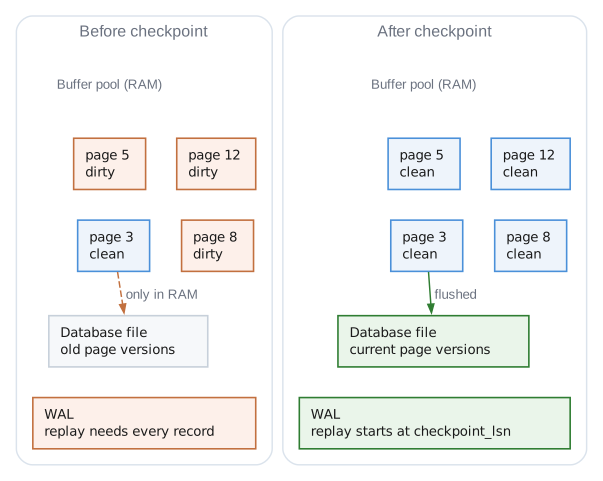
Without checkpointing, two bad things happen:
- WAL grows forever - Every transaction appends records, file gets huge
- Recovery takes forever - After crash, must replay entire WAL from the beginning
After a year of operation the WAL holds millions of records stretching back to day one, and recovery has to replay every one of them. Without checkpoints, startup time grows without bound.
The Solution
A checkpoint says: "Everything up to this point is safely on disk in the main database file. We don't need the old WAL records anymore."
How It Works Step by Step
Step 1: Write CHECKPOINT_BEGIN to WAL
WAL: [...existing records...][CHECKPOINT_BEGIN, lsn=1000]
This marks the start of the checkpoint. If we crash during checkpointing, recovery sees this and knows a checkpoint was in progress.
Step 2: Sync WAL
fsync(wal_file)
Ensures CHECKPOINT_BEGIN is on disk before we start flushing pages.
Step 3: Flush Dirty Pages
Scan the buffer pool and write dirty pages to the database file:
for each frame in buffer_pool:
    if frame.dirty:
        write frame.data to database_file at page offset
        frame.dirty = false
Passive mode: Skip pages that are currently pinned (in use by transactions). This avoids blocking active work.
Full mode: Wait for latches if needed. Guarantees all dirty pages are flushed.
Step 4: Sync Database File
fsync(database_file)
Critical! This ensures all the page writes are actually on disk, not sitting in OS buffers.
Step 5: Write CHECKPOINT_END to WAL
WAL: [...][CHECKPOINT_BEGIN][CHECKPOINT_END, lsn=1002]
This marks successful completion. The payload includes stats (pages flushed).
Step 6: Update checkpoint_lsn
wal_header.checkpoint_lsn = 1002  // LSN of CHECKPOINT_END
fsync(wal_file)
This is the key marker for recovery. It says "everything before LSN 1002 is safely on disk."
The Checkpoint Modes
Passive Mode
"Checkpoint what you can without disrupting active work"

for each frame:
    if dirty AND not pinned AND can get latch immediately:
        flush it
    else:
        skip it (maybe next time)
Good for: Background checkpointing during normal operation. Doesn't block transactions.
Bad: May leave some dirty pages unflushed.
Full Mode
"Checkpoint everything, wait if necessary"

for each frame:
    if dirty:
        wait for latch (spin until available)
        flush it
Good for: Complete checkpoint before shutdown, or when WAL is getting too large.
Bad: May briefly block transactions waiting for latches.
Truncate Mode
"Full checkpoint, then reset WAL to beginning"

1. Do full checkpoint
2. Truncate WAL file to just the header
3. Reset frame_count to 0
Good for: Reclaiming disk space when WAL has grown large.
Requires: No active readers (they might be reading old WAL frames).
Why CHECKPOINT_BEGIN and CHECKPOINT_END?
Consider what happens if we crash during checkpointing:
| Scenario | What is in the WAL | State of the database file | What recovery does |
|---|---|---|---|
Crash after CHECKPOINT_BEGIN, before any flush | BEGIN with no END | Unchanged | Sees the incomplete checkpoint, ignores it, replays from the previous checkpoint_lsn |
Crash after some flushes, before CHECKPOINT_END | BEGIN with no END | Some pages updated, some not | Sees the incomplete checkpoint and replays from the previous checkpoint_lsn; replay overwrites the partially flushed pages with correct data |
Crash after CHECKPOINT_END | BEGIN and END | Fully flushed | Sees a complete checkpoint and replays from the new checkpoint_lsn |
All three are safe. The checkpoint is only honoured once CHECKPOINT_END is on disk,
so a torn checkpoint costs replay time but never correctness.
Statistics
Each checkpoint returns stats:
CheckpointStats{
    pages_flushed: 42,        // How many dirty pages written
    duration_ns: 15_000_000,  // 15ms
    checkpoint_lsn: 1002,     // New checkpoint position
    wal_truncated: false,     // Whether WAL was reset
}
Useful for monitoring:
- If
pages_flushedis always high, consider checkpointing more often - If
duration_nsis high, disk might be slow - Track
checkpoint_lsngrowth over time
When to Checkpoint
// Check if WAL has grown too large
if checkpointer.shouldCheckpoint(max_wal_frames: 1000) {
    try checkpointer.checkpoint(.passive);
}
Common strategies:
- Size-based: When WAL exceeds N frames
- Time-based: Every N minutes
- Transaction-based: After N commits
- On shutdown: Always do full checkpoint before closing
Integration
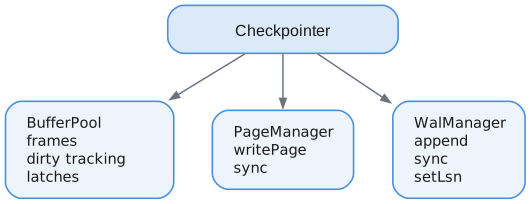
The Checkpointer coordinates between:
- BufferPool: Knows which pages are dirty
- PageManager: Writes pages to database file
- WalManager: Records checkpoint markers, updates checkpoint_lsn
API
var checkpointer = Checkpointer.init(allocator, &bp, &pm, &wal);

// Passive checkpoint (background)
const stats = try checkpointer.checkpoint(.passive);

// Full checkpoint (before shutdown)
const stats = try checkpointer.checkpoint(.full);

// Truncate checkpoint (reclaim WAL space)
const stats = try checkpointer.checkpoint(.truncate);

// Check if checkpoint needed
if (checkpointer.shouldCheckpoint(1000)) {
    _ = try checkpointer.checkpoint(.passive);
}

// Get last checkpoint stats
if (checkpointer.getLastStats()) |stats| {
    log("Flushed {} pages in {}ms", stats.pages_flushed, stats.duration_ns / 1_000_000);
}
Summary
| Concept | Purpose |
|---|---|
| Dirty page flush | Write modified pages to database file |
| checkpoint_lsn | Recovery starting point |
| CHECKPOINT_BEGIN/END | Crash safety during checkpoint |
| Passive mode | Non-blocking background checkpoint |
| Full mode | Complete checkpoint, may block briefly |
| Truncate mode | Reclaim WAL disk space |
Checkpointing is the bridge between WAL-based durability (fast commits) and bounded recovery time (fast restart). Without it, durability requires replaying the entire history on every startup.