Transaction Manager
What is a Transaction?
A transaction is a logical unit of work - a group of operations that should either all succeed or all fail together.
| Without transactions | With transactions | |
|---|---|---|
| Step 1 | Debit Alice $100 — succeeds | BEGIN |
| Step 2 | Crash | Debit Alice $100 |
| Step 3 | Credit Bob $100 — never runs | Credit Bob $100 |
| Step 4 | — | COMMIT |
| Result | Alice lost $100 and Bob got nothing | Either both happen or neither does |
The ACID Properties
Transactions guarantee four properties:
| Property | Meaning | How We Achieve It |
|---|---|---|
| Atomicity | All or nothing | WAL + rollback |
| Consistency | Valid state to valid state | Application logic |
| Isolation | Transactions don't interfere | Timestamps + MVCC |
| Durability | Committed = permanent | WAL + fsync |
The Core Data Structures
Transaction (User-Facing Handle)
This is what the application sees:
pub const Transaction = struct {
    id: u64,              // Unique identifier (1, 2, 3, ...)
    state: TxnState,      // active, committed, or aborted
    mode: TxnMode,        // read_only or read_write
    isolation: IsolationLevel,  // snapshot, read_committed, serializable
    start_ts: u64,        // When transaction started (for visibility)
    commit_ts: u64,       // When committed (0 until commit)
};
TxnEntry (Internal State)
The manager keeps more detailed state internally:
const TxnEntry = struct {
    txn: Transaction,           // The user-facing handle
    last_lsn: u64,              // LSN of most recent operation
    begin_lsn: u64,             // LSN of TXN_BEGIN record
    savepoints: ArrayList,      // Stack of savepoints
    undo_log: ArrayList,        // Operations to reverse on abort
};
TxnManager (The Coordinator)
pub const TxnManager = struct {
    allocator: Allocator,
    wal: *WalManager,                        // For durability
    active_txns: HashMap(u64, TxnEntry),     // All running transactions
    next_txn_id: u64,                        // Counter for IDs
    current_ts: u64,                         // Global timestamp clock
    committed_count: u64,                    // Statistics
    aborted_count: u64,
    mutex: Mutex,                            // Thread safety
};
Transaction Lifecycle
1. BEGIN
When you start a transaction:
- Lock the manager mutex.
- Assign
txn_id = 1. - Assign
start_ts = 1. appendRecord(TXN_BEGIN)— the WAL returnslsn = 1.- Create a
TxnEntrywithlast_lsn = 1. - Store it in
active_txns. - Unlock the mutex.
- Return
Transaction { id = 1, ... }to the caller.
The start_ts is crucial for isolation - it determines what data this transaction can "see".
2. Operations
Each modification goes through logOperation:
- Check
txn.canWrite(). - Look up the
TxnEntry. appendRecord(INSERT, txn_id = 1, prev_lsn = 1, payload = data)—prev_lsnis the entry's currentlast_lsn. The WAL returnslsn = 2.- Update
last_lsn = 2. - Return
lsn = 2to the caller.
Notice how prev_lsn points to the previous operation. This builds a backward chain.
3. COMMIT
Commit makes everything permanent:
- Check that
txn.state == active. appendRecord(TXN_COMMIT, prev_lsn = last_lsn).wal.sync()— this issues thefsync(), and it is the point at which the transaction becomes durable. Everything before this step can still be lost.- Assign
commit_ts. - Set
txn.state = committed. - Remove the entry from
active_txns. - Increment
committed_count. - Return to the caller.
The critical point: We only return success to the application AFTER fsync() completes. This is the durability guarantee.
Graph, vector, FTS, and stream mutations are staged in a transaction overlay until commit. At commit time the database logs the semantic graph state needed for recovery, stages graph changefeed records, flushes the WAL, and then applies the overlay to the base stores. Large property updates avoid carrying both old and new full values in commit-time WAL records when redo does not require both; the changefeed uses summary maps for values that would exceed stream/WAL sizing limits.
4. ABORT
Abort discards everything:
appendRecord(TXN_ABORT).wal.sync().- Set
txn.state = aborted. - Clean up the
TxnEntry. - Remove it from
active_txns. - Return to the caller.
We log TXN_ABORT so that during crash recovery, we know this transaction was intentionally aborted.
The prev_lsn Chain
Every record points back to the previous record from the same transaction. This creates a linked list through the WAL:
| LSN | Record | Transaction | prev_lsn |
|---|---|---|---|
| 1 | TXN_BEGIN | 1 | 0 |
| 2 | INSERT | 1 | 1 |
| 3 | TXN_BEGIN | 2 | 0 |
| 4 | UPDATE | 1 | 2 |
| 5 | DELETE | 2 | 3 |
| 6 | TXN_COMMIT | 1 | 4 |
Following prev_lsn backwards gives each transaction's chain without scanning the
whole log:
- Transaction 1: 6 → 4 → 2 → 1
- Transaction 2: 5 → 3
Why is this useful?
- Rollback: To abort transaction 1, follow 6->4->2->1, undoing each operation
- Recovery: After crash, find uncommitted transactions by following chains
- No scanning: Don't need to scan entire WAL to find a transaction's operations
Savepoints: Partial Rollback
Sometimes you want to undo part of a transaction, not all of it:
BEGIN;
    INSERT user Alice;           -- LSN 2
    SAVEPOINT before_orders;     -- Remember this point
    INSERT order #1;             -- LSN 4
    INSERT order #2;             -- LSN 5
    -- Oops, orders were wrong
    ROLLBACK TO before_orders;   -- Undo LSN 4, 5
    INSERT order #3;             -- LSN 7
COMMIT;
How Savepoints Work
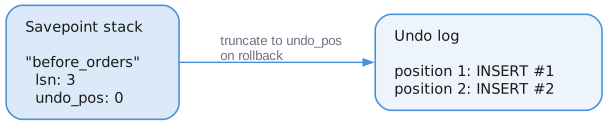
When we rollback to savepoint:
- Find the savepoint by name
- Log
SAVEPOINT_ROLLBACKto WAL - Truncate undo_log to
undo_position - Remove savepoints created after this one
Timestamps and Isolation
Every transaction gets two timestamps:
start_ts:  Assigned at BEGIN - determines what data is visible
commit_ts: Assigned at COMMIT - marks when changes become visible to others
Snapshot Isolation Example
| Timestamp | Transaction | Event |
|---|---|---|
| 1 | Txn A | BEGIN — start_ts = 1 |
| 2 | Txn A | INSERT x = 100 |
| 3 | Txn B | BEGIN — start_ts = 3 |
| 4 | Txn A | COMMIT — commit_ts = 4 |
| 5 | Txn B | Reads x |
Txn B began at ts = 3, before Txn A committed at ts = 4, so its snapshot does not
include x = 100 even though the read happens afterwards.
Question: What does Txn B see when it reads x?
With snapshot isolation: Txn B started at ts=3, before Txn A committed at ts=4. So Txn B does NOT see x=100. It sees whatever x was before Txn A.
This is why we track start_ts and commit_ts - they determine visibility.
Read-Only Transactions
Read-only transactions are special:
var txn = try tm.begin(.read_only, .snapshot);

// This fails:
const result = tm.logOperation(&txn, .insert, "data");
// Error: TxnError.ReadOnly
Why have read-only transactions?
- No WAL writes - faster, no disk I/O for reads
- No locks needed - can always proceed
- Never abort due to conflicts - just reads a snapshot
- Helps garbage collection - we know this txn won't modify old versions
Thread Safety
The TxnManager uses a mutex to protect shared state:
pub fn begin(self: *Self, ...) TxnError!Transaction {
    self.mutex.lock();         // ← Only one thread at a time
    defer self.mutex.unlock(); // ← Released when function exits

    // Safe to modify next_txn_id, active_txns, etc.
    ...
}
This is a simple approach. The mutex is held briefly (microseconds), and the WAL I/O dominates latency anyway.
Statistics
The manager tracks statistics for monitoring:
const stats = tm.getStats();

stats.active_count     // Currently running transactions
stats.committed_count  // Total successful commits
stats.aborted_count    // Total aborts
stats.oldest_active_id // Oldest running transaction
stats.current_ts       // Current timestamp
oldest_active_id is important for garbage collection - we can't clean up any data that this transaction might still need to see.
API Summary
var tm = TxnManager.init(allocator, &wal);

// Start a transaction
var txn = try tm.begin(.read_write, .snapshot);

// Log operations
_ = try tm.logOperation(&txn, .insert, payload);
_ = try tm.logOperation(&txn, .update, payload);

// Create savepoint
try tm.savepoint(&txn, "before_danger");

// More operations
_ = try tm.logOperation(&txn, .delete, payload);

// Rollback to savepoint if needed
try tm.rollbackToSavepoint(&txn, "before_danger");

// Commit or abort
try tm.commit(&txn);  // or tm.abort(&txn)
Integration
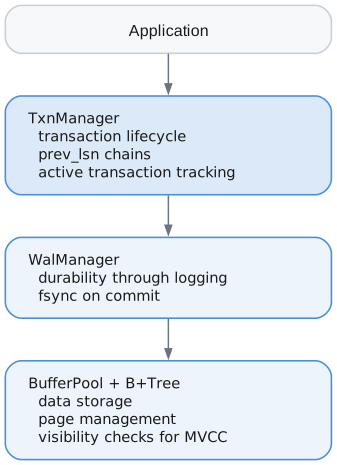
The Transaction Manager is the coordinator - it doesn't store data itself, but ensures that all operations follow ACID rules by orchestrating the WAL, tracking state, and enforcing invariants.