Vector Search
Overview
Lattice provides approximate nearest neighbor (ANN) search using the HNSW (Hierarchical Navigable Small World) algorithm. This enables semantic search over high-dimensional embedding vectors—a core requirement for AI/RAG applications.
Embedding Generation
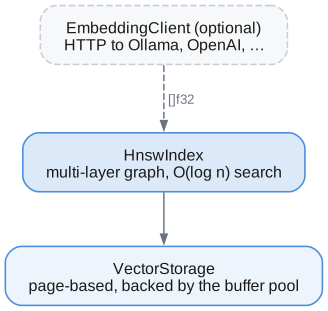
Lattice uses a bring your own embeddings approach by default. You can:
- Generate embeddings externally and pass them directly
- Use the optional
EmbeddingClientto call HTTP embedding APIs
Option 1: Bring Your Own Embeddings
// You generate embeddings however you want
const embedding: []const f32 = your_embedding_function("Hello world");

// Insert directly into HNSW index
try hnsw_index.insert(doc_id, embedding);
Option 2: HTTP Embedding Client
The EmbeddingClient calls external HTTP endpoints to generate embeddings. It's disabled by default—you must explicitly create and configure it.
const lattice = @import("lattice");

// Ollama (local) - simplest config
var client = lattice.EmbeddingClient.init(allocator, .{
    .endpoint = "http://localhost:11434/api/embeddings",
});
defer client.deinit();

// Generate embedding
const vector = try client.embed("Hello, world!");
defer allocator.free(vector);
Configuration Options
const config = lattice.EmbeddingConfig{
    // Required: HTTP endpoint URL
    .endpoint = "http://localhost:11434/api/embeddings",

    // Model name (default: "nomic-embed-text")
    .model = "nomic-embed-text",

    // API format: .ollama (default) or .openai
    .api_format = .ollama,

    // Optional API key for authenticated endpoints
    .api_key = null,

    // Request timeout in milliseconds (default: 30000)
    .timeout_ms = 30_000,
};
Supported API Formats
| Format | Request | Response |
|---|---|---|
.ollama | {"model": "...", "prompt": "..."} | {"embedding": [...]} |
.openai | {"model": "...", "input": "..."} | {"data": [{"embedding": [...]}]} |
Examples
Ollama (local)
var client = EmbeddingClient.init(allocator, .{
    .endpoint = "http://localhost:11434/api/embeddings",
    .model = "nomic-embed-text",
});
OpenAI
var client = EmbeddingClient.init(allocator, .{
    .endpoint = "https://api.openai.com/v1/embeddings",
    .model = "text-embedding-3-small",
    .api_format = .openai,
    .api_key = "sk-...",
});
Local OpenAI-compatible (llama.cpp, vLLM, etc.)
var client = EmbeddingClient.init(allocator, .{
    .endpoint = "http://localhost:8080/v1/embeddings",
    .model = "local-model",
    .api_format = .openai,
});
HNSW Index
HNSW (Hierarchical Navigable Small World) is a graph-based algorithm for approximate nearest neighbor search. It achieves O(log n) search complexity with high recall.
How HNSW Works
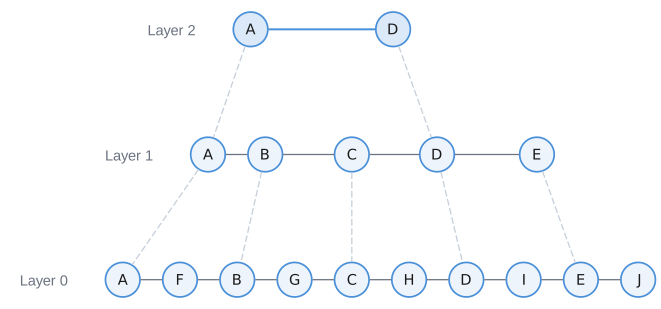
- Upper layers have exponentially fewer nodes (sparse)
- Search starts at top layer, greedily descends
- Layer 0 uses beam search for final candidates
- Each node maintains bidirectional connections to neighbors
Configuration
const config = lattice.HnswConfig{
    .m = 16,                    // Connections per node (layers 1+)
    .m_max0 = 32,              // Connections at layer 0
    .ef_construction = 200,    // Search width during insert
    .ef_search = 64,           // Search width during query
    .ml = 0.36067977,          // Level multiplier (1/ln(2))
    .metric = .cosine,         // Distance metric
};
| Parameter | Default | Description |
|---|---|---|
m | 16 | Max connections per node (higher = better recall, more memory) |
m_max0 | 32 | Max connections at layer 0 (typically 2×m) |
ef_construction | 200 | Beam width during insert (higher = better graph quality) |
ef_search | 64 | Beam width during search (higher = better recall, slower) |
metric | .cosine | Distance metric: .euclidean, .cosine, .inner_product |
API Usage
const lattice = @import("lattice");

// Initialize vector storage
var vector_storage = try lattice.VectorStorage.init(allocator, buffer_pool, 384);
defer vector_storage.deinit();

// Initialize HNSW index
var hnsw = lattice.HnswIndex.init(allocator, buffer_pool, &vector_storage, .{
    .metric = .cosine,
    .ef_search = 100,
});
defer hnsw.deinit();

// Insert vectors
try hnsw.insert(1, embedding1);
try hnsw.insert(2, embedding2);
try hnsw.insert(3, embedding3);

// Search for 10 nearest neighbors
const results = try hnsw.search(query_vector, 10, null);
defer hnsw.freeResults(results);

for (results) |result| {
    std.debug.print("ID: {}, Distance: {d:.4}\n", .{ result.id, result.distance });
}
Distance Metrics
| Metric | Formula | Best For |
|---|---|---|
.euclidean | √Σ(aᵢ - bᵢ)² | General purpose |
.cosine | 1 - (a·b)/(‖a‖‖b‖) | Text embeddings (normalized) |
.inner_product | -Σ(aᵢ × bᵢ) | When vectors are pre-normalized |
For text embeddings from most models (OpenAI, Cohere, etc.), use .cosine.
Vector Storage
Vectors are stored in pages managed by the buffer pool, separate from the HNSW graph structure.
| Offset | Size | Field |
|---|---|---|
| 0 | 1 B | page_type: u8 = 0x04 (vector data) |
| 1–2 | 2 B | dimensions: u16 |
| 3–4 | 2 B | vector_count: u16 |
| 5–8 | 4 B | next_page: u32 — overflow chain |
| 9–23 | 15 B | Reserved (header is 24 bytes total) |
| 24 → | variable | Slots, one per vector: [vector_id: u64][f32 × dimensions] |
Pages are 4096 bytes, so a page holds (4096 - 24) / (8 + 4 × dimensions) vectors
before spilling into the next page in the overflow chain.
Vectors per page depends on dimensions:
- 384-dim (1536 bytes): 2 vectors/page
- 768-dim (3072 bytes): 1 vector/page
- 1536-dim (6144 bytes): spans multiple pages
Performance Characteristics
| Operation | Complexity | Notes |
|---|---|---|
| Insert | O(log n) | Builds graph connections |
| Search (k-NN) | O(log n) | Independent of k for small k |
| Delete | O(m × log n) | Removes connections |
| Memory | O(n × m × layers) | ~1KB per vector at m=16 |
Tuning Guidelines
For higher recall:
- Increase
ef_search(e.g., 100-200) - Increase
m(e.g., 32-64) - Use more
ef_construction(e.g., 400)
For faster search:
- Decrease
ef_search(e.g., 32) - Accept lower recall
Typical configuration for 1M vectors:
.m = 16,
.m_max0 = 32,
.ef_construction = 200,
.ef_search = 64,  // Adjust based on recall/speed tradeoff
Complete Example
const std = @import("std");
const lattice = @import("lattice");

pub fn main() !void {
    var gpa = std.heap.GeneralPurposeAllocator(.{}){};
    defer _ = gpa.deinit();
    const allocator = gpa.allocator();

    // Setup storage (abbreviated)
    var buffer_pool = try lattice.BufferPool.init(allocator, page_manager, 1000);
    defer buffer_pool.deinit();

    // Initialize embedding client (optional)
    var embedder = lattice.EmbeddingClient.init(allocator, .{
        .endpoint = "http://localhost:11434/api/embeddings",
    });
    defer embedder.deinit();

    // Initialize vector storage and HNSW index
    var vector_storage = try lattice.VectorStorage.init(allocator, &buffer_pool, 384);
    defer vector_storage.deinit();

    var hnsw = lattice.HnswIndex.init(allocator, &buffer_pool, &vector_storage, .{
        .metric = .cosine,
    });
    defer hnsw.deinit();

    // Index some documents
    const docs = [_][]const u8{
        "Zig is a systems programming language",
        "Rust focuses on memory safety",
        "Go emphasizes simplicity and concurrency",
    };

    for (docs, 0..) |doc, i| {
        const embedding = try embedder.embed(doc);
        defer allocator.free(embedding);
        try hnsw.insert(i, embedding);
    }

    // Search
    const query_embedding = try embedder.embed("memory safe language");
    defer allocator.free(query_embedding);

    const results = try hnsw.search(query_embedding, 3, null);
    defer hnsw.freeResults(results);

    for (results) |result| {
        std.debug.print("Doc {}: distance {d:.4}\n", .{ result.id, result.distance });
    }
}
SIMD-Optimized Distance Functions
Distance calculations use Zig's @Vector for portable SIMD acceleration. This provides 4-8x speedup over scalar implementations for typical embedding dimensions (384, 768, 1536).
// All distance functions are SIMD-optimized
const dist = lattice.vector.distance.euclideanDistance(vec_a, vec_b);
const cos_dist = lattice.vector.distance.cosineDistance(vec_a, vec_b);
const ip_dist = lattice.vector.distance.innerProductDistance(vec_a, vec_b);

// Additional utilities
const dot = lattice.vector.distance.dotProduct(vec_a, vec_b);
const magnitude = lattice.vector.distance.norm(vec);
lattice.vector.distance.normalize(vec);  // in-place
Implementation details:
- Processes 8 floats at a time (AVX-256 compatible)
- Handles non-aligned remainder with scalar fallback
- Works on ARM NEON (128-bit, processed as 2×4)
Current Limitations
- In-memory graph: Node connections stored in memory (persisted to pages on write)
- No incremental persistence: Full graph rebuild on restart
- Single-threaded: No concurrent insert/search yet
Future Enhancements
- Persistent graph: Load HNSW structure from disk
- Concurrent access: Reader-writer locks for parallel search
- Product quantization: Compress vectors for larger datasets
- Filtered search: Combine with label/property predicates